
E-Payments Bank API
Version 2.1
What's new?
1. Support for Custom Tax Liabilities.
MRA processes domestic and customs tax payments.
For customs payments, a portion of the collected funds may be processing fees and/or inspection fees.
These funds must be credited to MRA processing fee account and inspection fee accounts respective bank.
The bank must be able to determine which account to credit based on the breakdown MRA provides at the time a PRN is validate.
Refer to the PRN Validation response for details on Tax Liability breakdown
2. Detailed specifications for the notes field of the PRN validation response.
The contents of E-Payments Bank API
e-Payments Overview
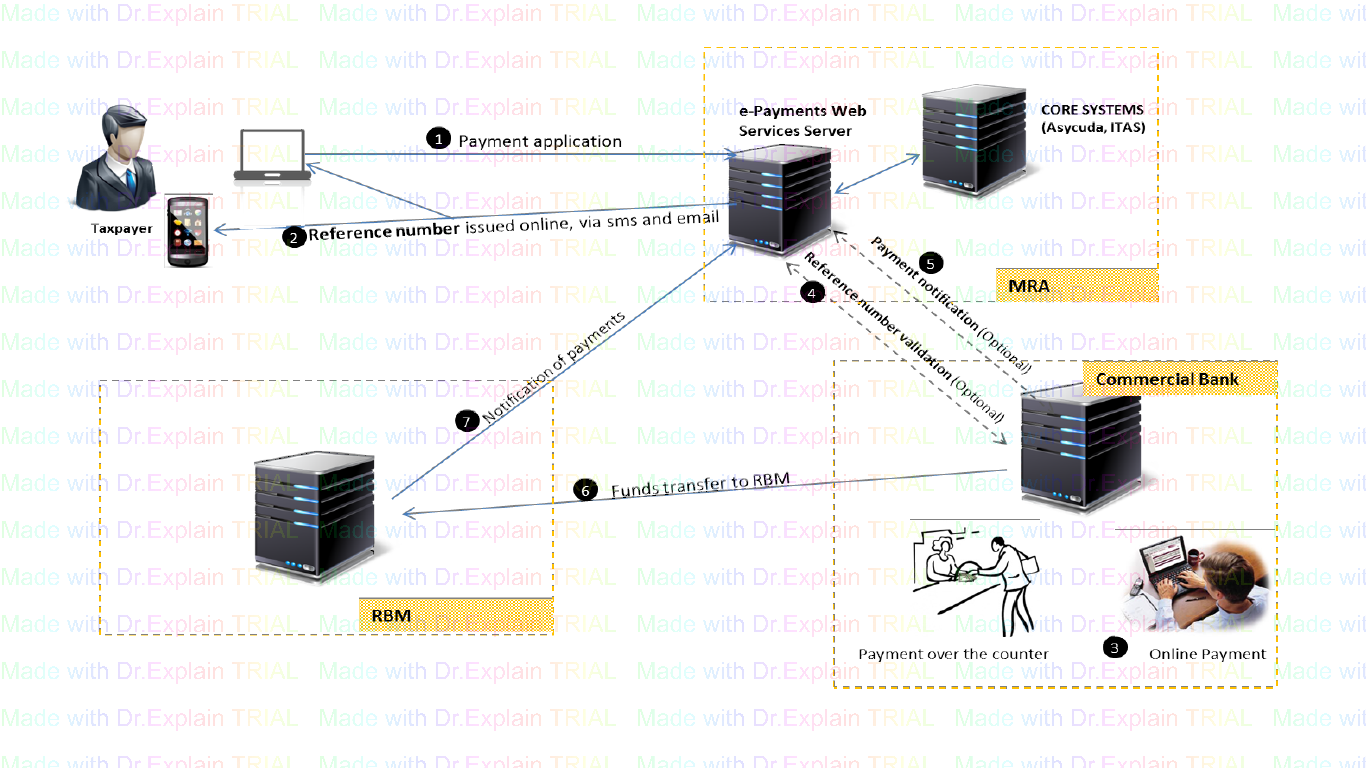
Architecture of the e-Payments solution
Web Services
Method Definitions
Method Signatures (Digital Fingerprint)
Results Code Definitions
e-Payments Overview
Version 2.1
What's new?
1. Support for Custom Tax Liabilities.
MRA processes domestic and customs tax payments.
For customs payments, a portion of the collected funds may be processing fees and/or inspection fees.
These funds must be credited to MRA processing fee account and inspection fee accounts respective bank.
The bank must be able to determine which account to credit based on the breakdown MRA provides at the time a PRN is validate.
Refer to the PRN Validation response for details on Tax Liability breakdown
2. Detailed specifications for the notes field of the PRN validation response.
About ePayments
The ePayments system provides means for the taxpayer to pay their tax liabilities online. The platform aims at minimizing chances of the taxpayer submitting incorrect information by validating the taxpayers input before they make the payment at the bank.
The platform involves three Major players.
I. MRA
II. The commercial banks
III. Reserve bank of Malawi
The contents of e-Payments Overview
I. MRA
II. Commercial Banks
III. Reserve Bank
MRA
1. A taxpayer will be required to login to a secured web based system that will be hosted at MRA to make a Payment application.
2. The website will prompt for the Taxpayer Identification Number (TPIN) and the type of payment (Domestic Taxes or Custom duties) they would like to pay.
3. Depending on their options, the system will prompt for other parameters such as Tax type, tax year, amount etc. These parameters will be validated against MRA core systems in real-time to ensure that the taxpayer is entering correct information.
4. Once the taxpayer enters all the required information, the information will be saved in an intermediate e-Payments database pending payment. A Payment Registration Number (PRN) will be generated by the system. The PRN will encode data such as expiry date, transaction date, check digits, a digit to specify the govt. account that must be credited etc.
5. The generated PRN will be sent to the taxpayers via email address or phone via SMS , or will be viewed online, whichever way convenient to the Taxpayer
Commercial Banks
1. Taxpayers will use their preferred channel (Mode) of payment offered by any bank of their choice (e.g. Internet Banking, Mobile Banking or over the teller counter).
2. Taxpayers will supply PRN and amount generated from MRA web based system and amount they would like to pay.
3. The banking system must issue a “ValidateReference” request to MRA web service to validate the existence, correctness and status of the PRN.
4. Once the PRN has been validated, the bank will receive the money from the taxpayer and deposit into MRA holding account. The PRN must be captured in the bank’s core system when capturing the deposit transaction.
5. The bank must send a “PaymentConfirmation” request to MRA web services to inform MRA that payment has been received. This request must be sent as soon as the deposit or funds transfer is completed successfully.
6. If the payment mode is cheque, the bank is required to send a follow up “UpdateChequeStatus” after 3 working days (T+3) to inform MRA if the cheque cleared or not. This is only applicable for interbank cheques as same bank cheques get value the same day.
7. The bank will be required to transmit these payment transactions to Reserve Bank at the interval agreed with MRA and in a format that RBM will agree with the banks.
Reserve Bank
1. RBM will be REQUIRED to send a “PaymentConfirmation” request to MRA web service to notify MRA that payment was made and funds have been deposited to the government account.
Architecture of the e-Payments solution
The contents of Architecture of the e-Payments solution
Web Services
Web Services
MRA will host web services on its servers. The Authority will host two environments of the services;
The contents of Web Services
1 Test Environment
2 Production Environment
Prerequisites to use e-payments web services
web Service Members
1. Test Environment
This will be used by the 3rd Party Financial Institutions to test the service client’s applications. The test environment will be used for certification prior to being given access to the production environment. The test server is hosted at https://eservices.mra.mw/ws/ePay/ePWS.asmx
2. Production Environment
This will be used as the live environment. All transactions will be effected in the Authorities Core systems.
Prerequisites to use e-payments web services
The following are requirements prior for a client application consumes MRA e-Payment web services.
1. Obtain Service Credentials
• This is a combination of UserID, ServiceKey unique for each third party trying to use the e-payment Services
2. Obtain a Salt.
• The salt will be used to create a hash value that will be treated as a message signature or digital finger print and will be sent together with every request.
3. Obtain a service key.
• This will be passed in every request.
web Service Members
The ePayment webservice has 3 methods. Below are the summaries of the methods and their use.
Method Name | Remark | Intended for |
ValidatePRN | Validates a Payment Registration Number (PRN). The method should be called prior to receiving payment from a tax payer. This validates the PRN expiry date, amount, existence etc. | This is intended for commercial banks and other 3rd Party Financial Institutions collecting payments on behalf of MRA |
PaymentNotification | This method is used to notify MRA that a commercial bank has received payment on behalf of MRA. This must be called every time a payment is done. MRA will send an acknowledgement via SMS, email and on the web to the taxpayer when this method is successful. | This is intended for commercial banks and other 3rd Party Financial Institutions collecting payments on behalf of MRA |
CBReceiptConfirmation | This method notifies MRA that funds have been transferred from the commercial bank to the government account at the Central Bank (RBM). | Central Bank |
Method Definitions
The contents of Method Definitions
Validate PRN
Payment Notification
Update Cheque status
Validate PRN
ValidatePRN
The validatePRN method validates a Payment Reference Number
Parameters
Parameter Name | Mandatory | Remark /Data Type | Remark |
UID | Yes | User ID : String | Unique ID for the client. This is given by MRA to all qualifying web service users. |
SK | Yes | Service Key : String | As supplied by MRA. |
PRN | Yes | Payment Registration Number: String | Generated by MRA and issued to taxpayers for use when making bank payments. |
Amount | Yes | Amount : Double | Amount in kwacha. For validation to pass, this must equal what the taxpayer specified during the Payment Registration process at MRA web portal. |
Return Value
Return a complex type PRNValidationResult
Important
Use the value of property ResultCode of the PRNValidationResult to determine if validation succeeded as follows;
1 = Validation passed (PRN is valid and pending payment)
(Any values other than 1) = Validation failed.
For a list of possible result codes refer to Result Codes Definitions on page 11
SOAP MESSAGES FOR ValidatePRN
SOAP 1.1
The following is a sample SOAP 1.1 request and response. The placeholders shown need to be replaced with actual values.
The following is a sample SOAP 1.2 request and response. The placeholders shown need to be replaced with actual values. POST /ws/ePay/ePWS.asmx HTTP/1.1 Host: eservices.mra.mw Content-Type: application/soap+xml; charset=utf-8 Content-Length: length <soap12:Envelope xmlns:xsi="http://www.w3.org/2001/XMLSchema-instance" xmlns:xsd="http://www.w3.org/2001/XMLSchema" xmlns:soap12="http://www.w3.org/2003/05/soap-envelope"> <soap12:Body> <ValidatePRN xmlns="http://eServices.mra.mw/3pfi/services"> <UID>string</UID> <SK>string</SK> <PRN>string</PRN> <Amount>double</Amount> </ValidatePRN> </soap12:Body> </soap12:Envelope> HTTP/1.1 200 OK Content-Type: application/soap+xml; charset=utf-8 Content-Length: length <?xml version="1.0" encoding="utf-8"?> <soap12:Body> <ValidatePRNResponse xmlns="http://eServices.mra.mw/3pfi/services"> <ValidatePRNResult> <ResultCode>int</ResultCode> <Remark>string</Remark> <PRNDetails> <Amount>double</Amount> <ExpiryDate>dateTime</ExpiryDate> <Notes>string</Notes> </PRNDetails> </ValidatePRNResult> </ValidatePRNResponse> </soap12:Body> </soap12:Envelope> The PRNValidation Result The PRN Validation response will help the bank to know whether the PRN exists or not. The validation will also; 1. Indicate the amount associated with the PRN through the validation response. The PRN validation response will contain the following fields; Field Name Data Type Length/Format Remarks Result Code Signed integer Remark String 100 A user-friendly descriptive message, this can be used on the financial institution core system because the messages are restricted in length and descriptive enough. PRN Details: Amount Decimal Amount associated with the PRN. This is the grand total and the break down is specified in the notes field. PRN Details: ExpiryDate DateTime YYYY-MM-DDThh:mm:ss Time when the PRN will expired in UTC format eg 2002-05-30T 09:00:00 PRN Details:Notes Text/XML XML string This field has been made to contain the details of the breakdown of the tax liabilities in XML format. The content of the field will be a valid XML with the specification highlighted here. The general response is thus as follows; The notes field The notes field has been designed to provide the taxpayers details and most importantly the breakdown of the tax liabilities so that the bank knows the amount and account to be credited. The contents of the field will always be a valid XML and a sample is shown below; As shown above the break down of the tax liabilities will be contained in the <liability> tag. Ideally there will be a maximum of 3 liabilities but the bank needs to loop through all the liabilities. Note that the liability amount is specified between the opening and closing liability tag. IMPORTANT NOTES FOR THE FINANCIAL INSTITUTIONS 1. At minimum, the PRN must be used on all transactions. XML Schema for the notes field For notifying MRA of a payment received from a taxpayer. Parameters Parameter Name Mandatory Remark /Data Type Remark UID Yes User ID: String Unique ID for the client. This is given by MRA to all qualifying web service users. SK Yes Service Key : String As supplied by MRA. DFP Yes Digital Finger Print: String This will be computed. Refer to algorithm below; PRN Yes Payment Registration Number: String Generated by MRA and issued to taxpayers for use when making bank payments. Amount Yes Amount: Double Amount in kwacha. For validation to pass, this must equal what the taxpayer specified during the Payment Registration process at MRA web portal. RN Yes Reference number. string Banks reference number. Must be unique for each transaction. PM Yes Payment Mode: String Payment method can either be: CS – Cash Payment CQ – Cheque Payment MB – Mobile Banking IB – Internet Banking MM – Mobile Money POS – Point of Sale device ATM – ATM EFT – Electronic Funds Transfer (From TD Yes Transaction Date: DateTime Date and time when the payment is made. 2009-06-15T13:45:30 for 15 June 2009, 1:45 PM BN No Branch Name: String Branch name or location where the payment is made from. This is optional. CBC Yes Commercial Bank Code/BIC : string Bank Identifier Codes (BIC) is the unique identification code. This will identify the bank that issued the cheque (for cheque payments). This field is only validated if Payment mode is cheque. For other payment modes, this should be set to the BIC for the requesting bank as listed here; http://www.theswiftcodes.com/malawi/ Or here; http://www.swift-code.com/malawi/ CN May be required Cheque Number(s) : String Cheque Numbers in case of a Cheque payment. RS1 No Reserved : String You may use this to pass any tag. The tag entered will be returned in the reconciliation file. E.g. If the bank decides to pass the username of teller, the same will be returned by MRA. RS2 No Reserved : String For cheque payments, pass T+0 for same bank cheque(same day clearance). or T+3 for interbank cheques. This field is ignored for non cheque payments. Digital Finger Print for the Payment Notification will be computed as follows: Step 1. Contactenate the following critical fields. UserID + ServiceKey + CommercialBankCode(BankSwiftCode) + ReferenceNumber + PaymentMode + PRN + mount_multiplied_by_100 example: UserID = 1234567 (As Supplied by MRA) So the concatenation will be performed as follows which will yield the string step1Result = 1234567ASSD-12321-123432-12112SDRBMMWAAATellerTxn0001CS17000121232112334 20170801qwertyqwtweqwuwe Step 2. Compute a SHA512 hash for the string. step2Result = SHA512(step1Result); Step 3. Encode the result from 2 to base64. OurDFP = Base64Of(step2Result ) For step 2 and 3 refer to sample code provided. Return Value Return a complex type PaymentNotificationResult. Important Use the value of property ResultCode of the Remark to determine if notification succeeded as follows; 1 = Successful (Any value other than one) = Failed. The Receipt number returned in the response is uniquely by MRA and must be stored in the banks system for ease of reconciliation. For a list of possible result codes refer to Result Codes Definitions on page 11 SOAP 1.1 The following is a sample SOAP 1.1 request and response. The placeholders shown need to be replaced with actual values. POST /ws/ePay/ePWS.asmx HTTP/1.1 Host: eservices.mra.mw Content-Type: text/xml; charset=utf-8 Content-Length: length SOAPAction: "http://eServices.mra.mw/3pfi/services/PaymentNotification" <?xml version="1.0" encoding="utf-8"?> <soap:Envelope xmlns:xsi="http://www.w3.org/2001/XMLSchema-instance" xmlns:xsd="http://www.w3.org/2001/XMLSchema" xmlns:soap="http://schemas.xmlsoap.org/soap/envelope/"> <soap:Body> <PaymentNotification xmlns="http://eServices.mra.mw/3pfi/services"> <UID>string</UID> <SK>string</SK> <DFP>string</DFP> <PRN>string</PRN> <Amount>double</Amount> <RN>string</RN> <PM>string</PM> <TD>dateTime</TD> <BN>string</BN> <CBC>string</CBC> <CN>string</CN> <RS1>string</RS1> <RS2>string</RS2> </PaymentNotification> </soap:Body> </soap:Envelope> HTTP/1.1 200 OK Content-Type: text/xml; charset=utf-8 Content-Length: length <?xml version="1.0" encoding="utf-8"?> <soap:Envelope xmlns:xsi="http://www.w3.org/2001/XMLSchema-instance" xmlns:xsd="http://www.w3.org/2001/XMLSchema" xmlns:soap="http://schemas.xmlsoap.org/soap/envelope/"> <soap:Body> <PaymentNotificationResponse xmlns="http://eServices.mra.mw/3pfi/services"> <PaymentNotificationResult> <ResultCode>int</ResultCode> <ReceiptNumber>string</ReceiptNumber> <Remark>string</Remark> </PaymentNotificationResult> </PaymentNotificationResponse> </soap:Body> </soap:Envelope> SOAP 1.2 The following is a sample SOAP 1.2 request and response. The placeholders shown need to be replaced with actual values. POST /ws/ePay/ePWS.asmx HTTP/1.1 Host: eservices.mra.mw Content-Type: application/soap+xml; charset=utf-8 Content-Length: length <?xml version="1.0" encoding="utf-8"?>13 <soap12:Envelope xmlns:xsi="http://www.w3.org/2001/XMLSchema-instance" xmlns:xsd="http://www.w3.org/2001/XMLSchema" xmlns:soap12="http://www.w3.org/2003/05/soap-envelope"> <soap12:Body> <PaymentNotification xmlns="http://eServices.mra.mw/3pfi/services"> <UID>string</UID> <SK>string</SK> <DFP>string</DFP> <PRN>string</PRN> <Amount>double</Amount> <RN>string</RN> <PM>string</PM> <TD>dateTime</TD> <BN>string</BN> <CBC>string</CBC> <CN>string</CN> <RS1>string</RS1> <RS2>string</RS2> </PaymentNotification> </soap12:Body> </soap12:Envelope> HTTP/1.1 200 OK Content-Type: application/soap+xml; charset=utf-8 Content-Length: length <?xml version="1.0" encoding="utf-8"?> <soap12:Envelope xmlns:xsi="http://www.w3.org/2001/XMLSchema-instance" xmlns:xsd="http://www.w3.org/2001/XMLSchema" xmlns:soap12="http://www.w3.org/2003/05/soap-envelope"> <soap12:Body> <PaymentNotificationResponse xmlns="http://eServices.mra.mw/3pfi/services"> <PaymentNotificationResult> <ResultCode>int</ResultCode> <ReceiptNumber>string</ReceiptNumber> <Remark>string</Remark> </PaymentNotificationResult> </PaymentNotificationResponse> </soap12:Body> </soap12:Envelope> Update Cheque status For cheque Payments Parameters Parameter Name Mandatory Remark/Data Type Remark UID Yes User ID: String Unique ID for the client. This is given by MRA to all qualifying web service users. SK Yes Service Key: String As supplied by MRA. PRN Yes Payment Registration Number: String Generated by MRA and issued to taxpayers for use when making bank payments. Cleared Yes isChequeCleared: Boolean Flag to indicate whether the cheque is cleared or not Remark No Remark: string Remark on why the cheque failed to clear e.g. Insufficient funds. Return Value Return a complex type UpdateChequeStatusResult. Important 1 = Successful (Any value other than one) = Failed. For a list of possible result codes refer to Result Codes Definitions on page 11 SOAP 1.1 The following is a sample SOAP 1.1 request and response. The placeholders shown need to be replaced with actual values. POST /ws/epay/epws.asmx HTTP/1.1 Host: eservices.mra.mw Content-Type: text/xml; charset=utf-8 Content-Length: length SOAPAction: "http://eServices.mra.mw/3pfi/services/UpdateChequeStatus" <?xml version="1.0" encoding="utf-8"?>15 <soap:Envelope xmlns:xsi="http://www.w3.org/2001/XMLSchema-instance" xmlns:xsd="http://www.w3.org/2001/XMLSchema" xmlns:soap="http://schemas.xmlsoap.org/soap/envelope/"> <soap:Body> <UpdateChequeStatus xmlns="http://eServices.mra.mw/3pfi/services"> <UID>string</UID> <SK>string</SK> <PRN>string</PRN> <Cleared>boolean</Cleared> <Remark>string</Remark> </UpdateChequeStatus> </soap:Body> </soap:Envelope> HTTP/1.1 200 OK Content-Type: text/xml; charset=utf-8 Content-Length: length <?xml version="1.0" encoding="utf-8"?> <soap:Envelope xmlns:xsi="http://www.w3.org/2001/XMLSchema-instance" xmlns:xsd="http://www.w3.org/2001/XMLSchema" xmlns:soap="http://schemas.xmlsoap.org/soap/envelope/"> <soap:Body> <UpdateChequeStatusResponse xmlns="http://eServices.mra.mw/3pfi/services"> <UpdateChequeStatusResult> <ResultCode>int</ResultCode> <Remark>string</Remark> <ChequeDetails> <ChequeNumber>string</ChequeNumber> <ChequeBank>string</ChequeBank> </ChequeDetails> </UpdateChequeStatusResult> </UpdateChequeStatusResponse> </soap:Body> </soap:Envelope> SOAP 1.2 The following is a sample SOAP 1.2 request and response. The placeholders shown need to be replaced with actual values. POST /ws/epay/epws.asmx HTTP/1.1 Host: eservices.mra.mw Content-Type: application/soap+xml; charset=utf-8 Content-Length: length <?xml version="1.0" encoding="utf-8"?> <soap12:Envelope xmlns:xsi="http://www.w3.org/2001/XMLSchema-instance" xmlns:xsd="http://www.w3.org/2001/XMLSchema" xmlns:soap12="http://www.w3.org/2003/05/soap-envelope"> <soap12:Body> <UpdateChequeStatus xmlns="http://eServices.mra.mw/3pfi/services"> <UID>string</UID> <SK>string</SK> <PRN>string</PRN> <Cleared>boolean</Cleared> <Remark>string</Remark> </UpdateChequeStatus>16 </soap12:Body> </soap12:Envelope> HTTP/1.1 200 OK Content-Type: application/soap+xml; charset=utf-8 Content-Length: length <?xml version="1.0" encoding="utf-8"?> <soap12:Envelope xmlns:xsi="http://www.w3.org/2001/XMLSchema-instance" xmlns:xsd="http://www.w3.org/2001/XMLSchema" xmlns:soap12="http://www.w3.org/2003/05/soap-envelope"> <soap12:Body> <UpdateChequeStatusResponse xmlns="http://eServices.mra.mw/3pfi/services"> <UpdateChequeStatusResult> <ResultCode>int</ResultCode> <Remark>string</Remark> <ChequeDetails> <ChequeNumber>string</ChequeNumber> <ChequeBank>string</ChequeBank> </ChequeDetails> </UpdateChequeStatusResult> </UpdateChequeStatusResponse> </soap12:Body> </soap12:Envelope> Method Signatures (Digital Fingerprint) As part of security, some web methods will request that the 3rd Party system supply a digital finger print (Parameter is named SK in the web methods). This is to ensure authenticity and integrity of the data. The specifics for computing the digital signatures are discussed in detail per web method. In general, to compute a digital finger print for a message; 1. Critical parameters are concatenated in a defined order (These parameters and their order is discussed for each web method). Java Sample This table explains possible result codes that can be returned by the web service Result Code Meaning 1 Success. Transaction was successful e.g.validation passed, payment notification successful -10 Invalid User Identification Number (UID) supplied. UID isissued to you by MRA. -11 Invalid Service Key (SK) supplied. Service key is issued to you by MRA. -17 Host not allowed. The IPaddress of the machine accessing the web service is not allowed. Consult MRA for addition or modification of existing IP addresses. -18 User does not have sufficient privilege to access a web service method.Consult MRA. -99 General Error. Typically system error from the ePayment server. This result code can only be returned in unlikely event of unexpected error at the server. -100 PRN does not exist. -101 PRN is expired -200 Amount specified is lower than amount in the ePayment server. Confirm with the tax payer. -300 Amount specified is higher than amount in the ePayment server. Confirm with the tax payer. -400 PRN is already paid for. -401 Digital Finger Print mismatch. See Message Signatures (Digital Fingerprint) on page 16. -402 Unsupported Payment Mode (PM). -403 Missing cheque number for CHEQUE transactions. -404 Missing Financial Institution Reference number. -405 Transaction date is outside acceptable date range. Could be future date or backdated beyond MRA expected minimum date. Consult MRA or use current date. -500 One or more mandatory arguments missing. Examine remark property for details. -501 Invalid Clearance Day. Occurs when field RS2 for payment notification method is not set to T+0 or T+3. -502 Occurs when trying to update cheque status before payment notification is issued. -503 Occurs when trying to update cheque status for a a non cheque payment. -504 Occurs when bank issue a clearance period other than T+0 for same bank cheques. The system compares the BIC for the bank cheque vs the requesting users BIC as set at MRA. -999 Amendments not allowed A LIST OF BIC MALAWI BIC NAME CDHIMWMW CDH INVESTMENT BANK (CDHIB) CODHMWM1 CONTINENTAL DISCOUNT HOUSE LIMITED ECOCMWMW ECOBANK MALAWI LIMITED FDHFMWMW FDH BANK LIMITED FIMWMWM1 FINCOM BANK OF MALAWI LIMITED (FINCOM) FMERMWMW FIRST MERCHANT BANK LTD. MALAWI INNKMWMW INDEBANK LIMITED ICBMMWMW INTERNATIONAL COMMERCIAL BANK MALAWI MSBLMWMW MALAWI SAVINGS BANK LIMITED XMSWMWM1 MALAWI STOCK EXCHANGE NBMAMWMW NATIONAL BANK OF MALAWI NBSTMWMW NBS BANK LIMITED NEDMMWMW NEDBANK (MALAWI) LIMITED OPILMWMW OPPORTUNITY INTERNATIONAL BANK OF MALAWI RBMAMWMW RESERVE BANK OF MALAWI SBICMWMX STANDARD BANK LIMITED MALAWI SBMWMWM1 STOCKBROKERS MALAWI LIMITED TRETMWM1 TRUST SECURITIES LIMITEDPOST
/ws/ePay/ePWS.asmx SOAPHTTP/1.1
Host: eservices.mra.mw
Content-Type: text/xml; charset=utf-8
Content-Length: length<?xml version="1.20" encoding="utf-8"?>
<soap:Envelope xmlns:xsi="http://www.w3.org/2001/XMLSchema-instance" xmlns:xsd="http://www.w3.org/2001/XMLSchema" xmlns:soap="http://schemas.xmlsoap.org/soap/envelope/">
<soap:Body>
<ValidatePRN xmlns="http://eServices.mra.mw/3pfi/services">
<UID>string</UID>
<SK>string</SK>
<PRN>string</PRN>
<Amount>double</Amount>
</ValidatePRN>
</soap:Body>
</soap:Envelope>
HTTP/1.1 200 OK
Content-Type: text/xml; charset=utf-8
Content-Length: length
<?xml version="1.0" encoding="utf-8"?>
<soap:Envelope xmlns:xsi="http://www.w3.org/2001/XMLSchema-instance" xmlns:xsd="http://www.w3.org/2001/XMLSchema" xmlns:soap="http://schemas.xmlsoap.org/soap/envelope/">
<soap:Body>
<ValidatePRNResponse xmlns="http://eServices.mra.mw/3pfi/services">
<ValidatePRNResult>
<ResultCode>int</ResultCode>
<Remark>string</Remark>
<PRNDetails>
<Amount>double</Amount>
<ExpiryDate>dateTime</ExpiryDate>
<Notes>string</Notes>
</PRNDetails>
</ValidatePRNResult>
</ValidatePRNResponse>
</soap:Body>
</soap:Envelope>
<?xml version="1.0" encoding="utf-8"?>9
<soap12:Envelope xmlns:xsi="http://www.w3.org/2001/XMLSchema-instance" xmlns:xsd="http://www.w3.org/2001/XMLSchema" xmlns:soap12="http://www.w3.org/2003/05/soap-envelope">The contents of Validate PRN
The PRNValidation Result
2. Indicate the breakdown of the tax liabilities and the target bank accounts where the liability has to be posted.<soap12:Envelope xmlns:xsi="http://www.w3.org/2001/XMLSchema-instance" xmlns:xsd="http://www.w3.org/2001/XMLSchema" xmlns:soap12="http://www.w3.org/2003/05/soap-envelope">
<soap12:Body>
<ValidatePRNResponse xmlns="http://eServices.mra.mw/3pfi/services">
<ValidatePRNResult>
<ResultCode>int</ResultCode>
<Remark>string</Remark>
<PRNDetails>
<Amount>double</Amount>
<ExpiryDate>dateTime</ExpiryDate>
<Notes>string</Notes>
</PRNDetails>
</ValidatePRNResult>
</ValidatePRNResponse>
</soap12:Body>
</soap12:Envelope>The contents of The PRNValidation Result
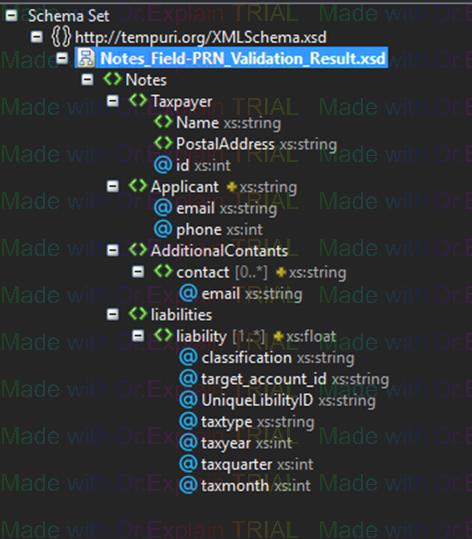
XML Schema for the notes field
The notes field <?xml version="1.0" encoding="utf-16"?>
<Notes>
<Taxpayer id="20202020">
<Name>SAMPLE TRADER</Name>
<PostalAddress>
PRIVATE BAG 247
CHICHIRI
MALAWI
</PostalAddress>
</Taxpayer>
<Applicant email="representant@company.com" phone="265888661565">MR REPRESENTATIVE</Applicant>
<AdditionalContants />
<liabilities>
<liability classification="CUSTOMS" target_account_id="PFEE-AC" UniqueLibilityID="CUS133"
taxtype="EXC" declaration_number="37-C-2017-02-17">195495.00</liability>
<liability classification="CUSTOMS" target_account_id="INSP-AC" UniqueLibilityID="CUS134"
taxtype="DIF" declaration_number="37-C-2017-02-17">30000.00</liability>
<liability classification="CUSTOMS" target_account_id="MAIN-AC" UniqueLibilityID="CUS135"
taxtype="ICD" declaration_number="37-C-2017-02-17">900000.00</liability>
<liability classification="CUSTOMS" target_account_id="MAIN-AC" UniqueLibilityID="CUS136"
taxtype="VAT" declaration_number="37-C-2017-02-17">675757.00</liability>
<liability classification="CUSTOMS" target_account_id="PFEE-AC" UniqueLibilityID="CUS137"
taxtype="FEE" declaration_number="37-C-2017-02-17">10000.00</liability>
</liabilities>
</Notes>
Of particular importance is the target account ID whose values will be any of the following of possibilities.
1. PFEE-AC : This should be translated by the bank to the actual account MRA opens with the bank for collection of processing fees;
2. INSP-AC : This should be translated by the bank to the actual account MRA opens with the bank for collection of Inspection fees;
3. MAIN-AC : This should be translated by the bank to the actual account MRA opens with the bank for collection of government taxes (Main collection account); The schema for the notes field is visualized below and available in text format here.
2. We recommend the parameterizations of the translation of the account IDs to actual bank accounts and design the solution to accommodate new translations (for instance; If we start collecting TEVET levy into a different account)<?xml version="1.0" encoding="utf-8"?>
<xs:schema targetNamespace="http://tempuri.org/XMLSchema.xsd"
elementFormDefault="qualified"
xmlns="http://tempuri.org/XMLSchema.xsd"
xmlns:mstns="http://tempuri.org/XMLSchema.xsd"
xmlns:xs="http://www.w3.org/2001/XMLSchema"
<xs:element name="Notes">
<xs:complexType>
<xs:sequence>
<xs:element name="Taxpayer" maxOccurs="1" minOccurs="1">
<xs:complexType>
<xs:sequence>
<xs:element type="xs:string" name="Name"/>
<xs:element type="xs:string" name="PostalAddress"/>
</xs:sequence>
<xs:attribute type="xs:int" name="id"/>
</xs:complexType>
</xs:element>
<xs:element name="Applicant" maxOccurs="1" minOccurs="1">
<xs:complexType>
<xs:simpleContent>
<xs:extension base="xs:string">
<xs:attribute type="xs:string" name="email"/>
<xs:attribute type="xs:int" name="phone"/>
</xs:extension>
</xs:simpleContent>
</xs:complexType>
</xs:element>
<xs:element name="AdditionalContants">
<xs:complexType>
<xs:sequence>
<xs:element name="contact" maxOccurs="unbounded" minOccurs="0">
<xs:complexType>
<xs:simpleContent>
<xs:extension base="xs:string">
<xs:attribute type="xs:string" name="email" use="optional"/>
</xs:extension>
</xs:simpleContent>
</xs:complexType>
</xs:element>
</xs:sequence>
</xs:complexType>
</xs:element>
<xs:element name="liabilities">
<xs:complexType>
<xs:sequence>
<xs:element name="liability" maxOccurs="unbounded" minOccurs="1">
<xs:complexType>
<xs:simpleContent>
<xs:extension base="xs:float">
<xs:attribute type="xs:string" name="classification"/>
<xs:attribute type="xs:string" name="target_account_id"/>
<xs:attribute type="xs:string" name="UniqueLibilityID"/>
<xs:attribute type="xs:string" name="taxtype"/>
<xs:attribute type="xs:string" name="declaration_number"/>
<xs:attribute type="xs:int" name="taxyear"/>
<xs:attribute type="xs:int" name="taxquarter"/>
<xs:attribute type="xs:int" name="taxmonth"/>
</xs:extension>
</xs:simpleContent>
</xs:complexType>
</xs:element>
</xs:sequence>
</xs:complexType>
</xs:element>
</xs:sequence>
</xs:complexType>
</xs:element>
</xs:schema>
Payment Notification
TransactionDate (in the format yyyyMMdd eg 20141201 For 1 December 2014) + salt
ServiceLKey = ASSD-12321-123432-12112SD (as supplied by MRA)
CBC = RBMMWAAA (As supplied by MRA/Bank Identification codes are also available from http://www.swift-code.com/malawi/ )
ReferenceNumber = TellerTxn0001 (Any unique reference from the bank that MRA can quote to assist the bank easilily retrieve the transaction from their system)
PaymentMode = CS (CS is code for Cash)
PRN = 170001212321 (Payment Registration Number, generated by taxpayer on MyTax Online Portal)
Amount = K123.34 -> 12334 (Amount will be translated to in tambala by multiplying with 100 -> K1 = 100t, so 123.34 will be passed as 12334 e.t.c)
TransactionDate = 1 August 2017 -> 20170801 (This will transalated to 20170801 yyyyMMdd)
Salt = qwertyqwtweqwuwe (As supplied by MRA)
1234567 + ASSD-12321-123432-12112SD + RBMMWAAA + TellerTxn0001 + CS + 170001212321 + 12334 + 20170801 + qwertyqwtweqwuweSOAP MESSAGES FOR Payment Notification
Use the value of property ResultCode of the Remark to determine if notification succeeded as follows;SOAP MESSAGES FOR UpdateChequeStatus Method
2. A salt given by MRA is appended to the concatenated values.
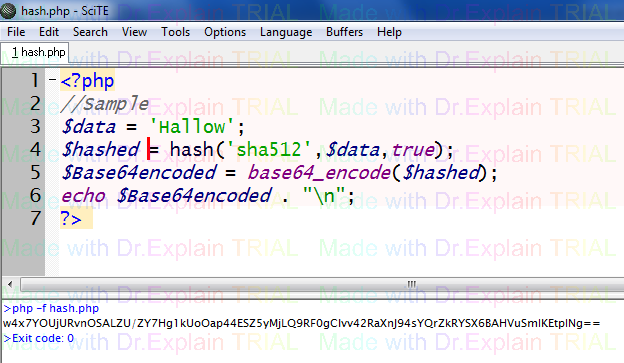
3. A SHA512 hash is computed on the salt and field concatenated value.
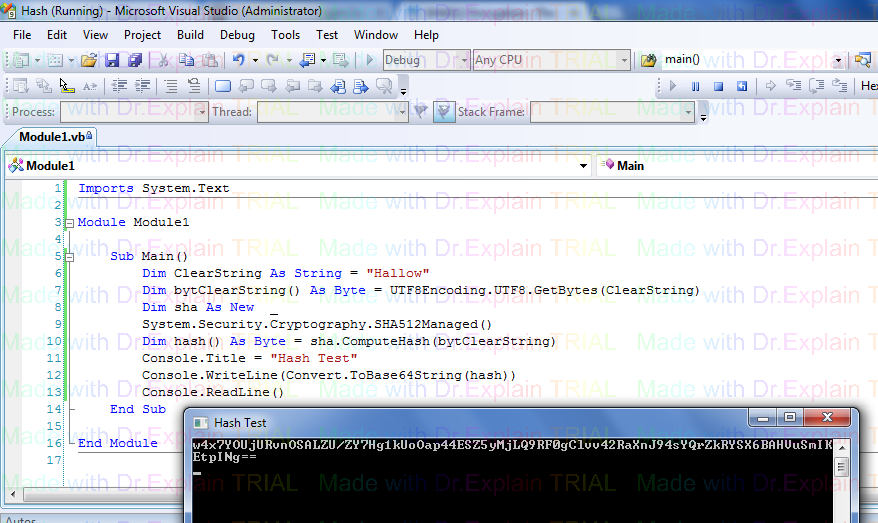
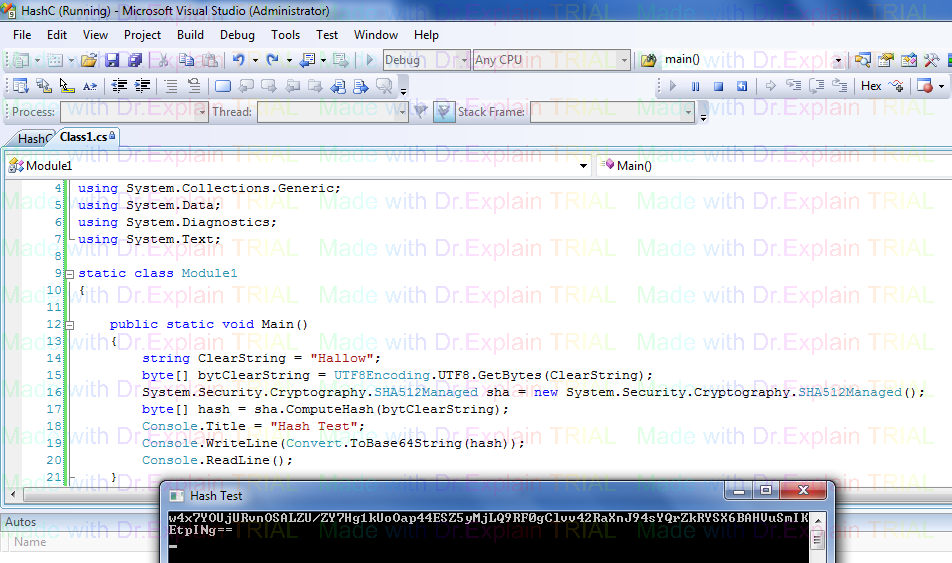
4. The SHA512 string is converted to base64 and the resultant is our digital fingerprint.
Examples on how to compute a SHA512 and convert to base 64 encoded string are provided below;The contents of Method Signatures (Digital Fingerprint)
PHP Sample
VB .NET Sample
C# Sample
Java Sample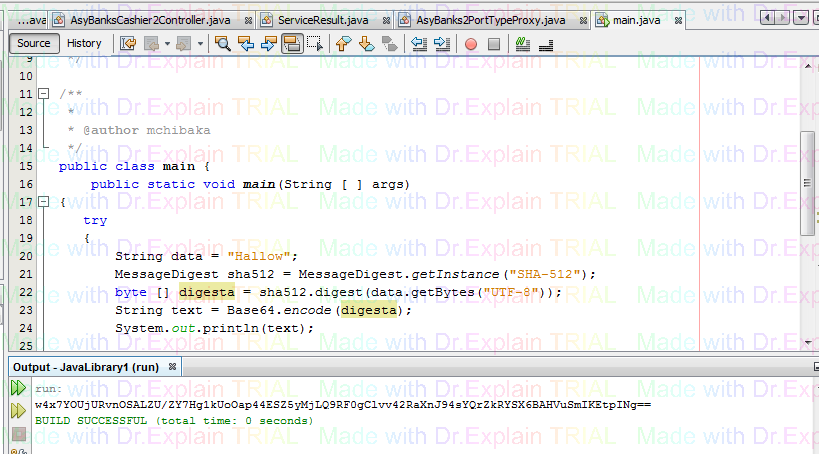
PHP Sample
VB .NET Sample
C# Sample
Results Code Definitions